Case study
A Diet Plan I Couldn't Read, and the Board I Built Instead
My dietician's plan came as pages of text, and I needed to see a whole week at once. So I built a board for it, and then the board taught me to measure a number before I trust it.
My dietician typed up my meal plan while we talked and sent it to me as a PDF: seven days, four meals a day, every ingredient and amount spelled out over several pages of text. It was a good plan. Everything I needed was in there. I just couldn’t process it as written.
I’m AuDHD, and I love to read. I can go through hundreds of pages of fiction without a second thought. Long nonfiction with nothing visual to hold onto has always been a different story though, and this particular meal plan was about as non-visual as nonfiction gets. I tried hard to use it as written. My dietician wrote it out for me on April 24, but by May 8, I knew I needed something else. So that morning, I wrote to ChatGPT about it:
Good morning. Can you please turn this 7 day planner into something more graphical? I really like to read, but I need something more visual (for lack of a better word) to see it all at once. Preferably something where I can move the individual groups (say, lunch on Day 2 or snack on Day 5) around like puzzle pieces?
Everything that follows grew out of that request.
Turning the text into a board
The first version was a board. Seven day columns, four meal cards in each, color-coded by meal and labeled in text too, so the color was never the only way to tell breakfast from dinner. You could drag a meal to another day or swap two in place, and the macros and the grocery list followed along.
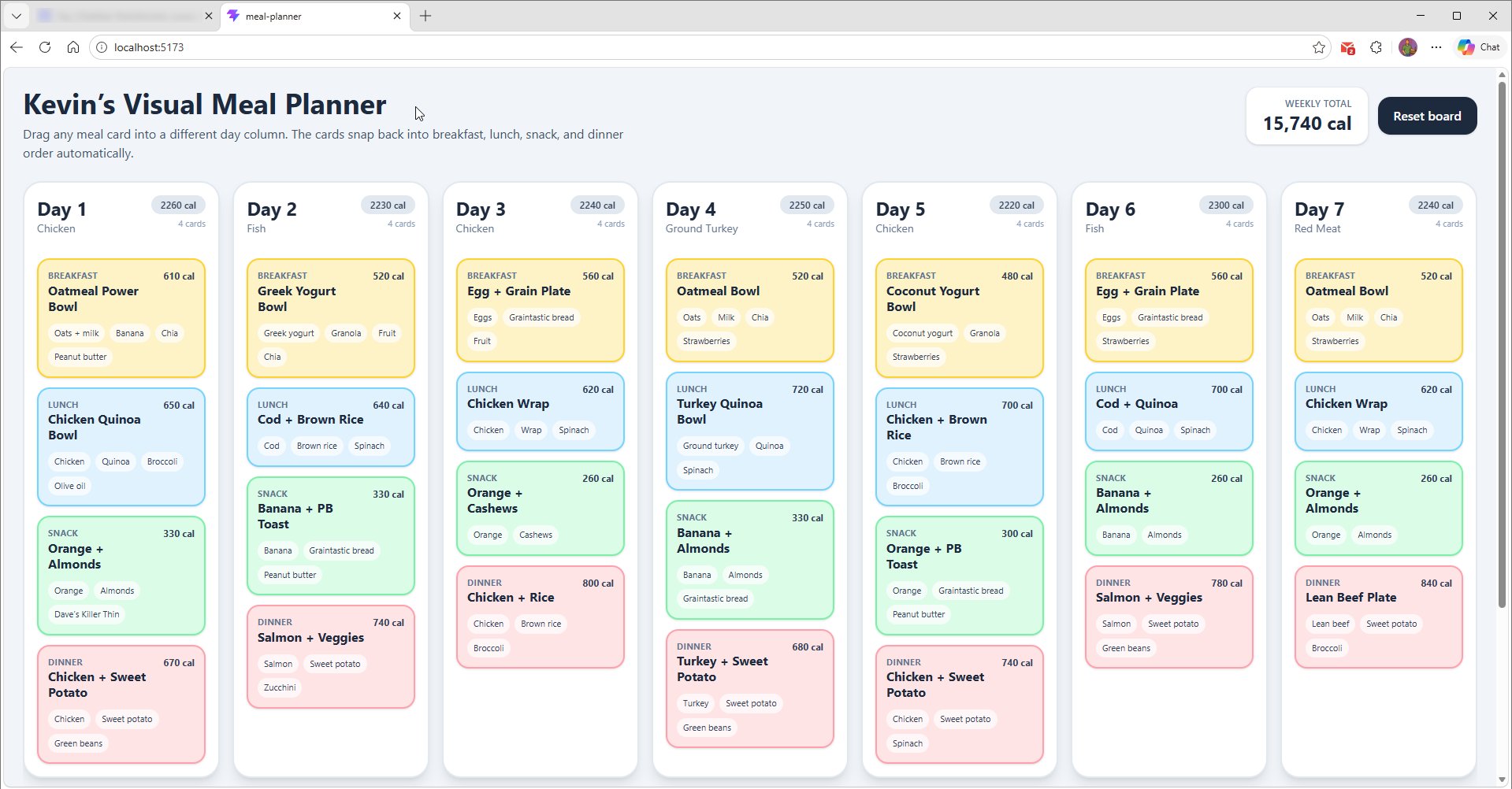
All seven days looked great side by side, as you see. There was just one problem with it, and I couldn’t see it at the time because I was content with seeing all seven days. It looked great on my monitor because it’s a 21:9 ultra-widescreen. Because it was running on localhost from my desktop PC, that was the only place I could preview it.
As soon as it was actually published though, I found the problem. When I tried to load the board on my 16:9 laptop screen or my 19.5:9 phone screen, the view stopped looking so great. On the laptop screen, the first four days widened to cover the whole width and I had to scroll horizontally to see the other days. On my phone screen, I could see Day 1, but I couldn’t swipe sideways to see the other days at all.
By early July I’d moved the project into Claude Code. I wouldn’t have called it a v0.1 at that point (“Maybe a v0.3,” I said), but it had problems I could list. The day cards didn’t size properly unless the window was full screen. The header scrolled away when you scrolled sideways. And on a phone it was hopeless. Those turned out to be one bug, not three: the whole page, header and all, sat inside the box that held the seven columns, which by then refused to be narrower than 1,750 pixels.
When the numbers didn’t add up
The board could look up each ingredient in USDA’s nutrition database. But the database counts per 100 grams, and the plan said things like “¾ cup oats.” On a walk one night I realized the board would have to turn every cup and slice into grams before the numbers meant anything, so that went on the to-do list, and eventually it got built.
Once it worked, I ran it across the whole week and compared the result with the plan. My dietician had revised the plan to 14,000 kcal a week. The board said 11,801, sixteen percent short.
It would have been easy to assume her numbers were off. Mostly they weren’t. Almost all of the gap came from the table my app used to turn “a cup” or “a large” into grams:
| Ingredient | The board said | Should be | What was wrong |
|---|---|---|---|
| 0.5 large sweet potato | 25 g | 90 g | “Large” was a flat 50 g. That’s an egg. |
| 1 cup broccoli | 30 g | 91 g | Filed as a leafy green. Florets aren’t leaves. |
| 1 whole wheat wrap | 100 g | 55 g | A generic “each” instead of a tortilla. |
| 0.75 cup lentils | 113 g | 144 g | Dry lentils run about 192 g a cup. |
Oats had their own story. The table weighed a cup of oats at 190 g, which is fine for rice and badly wrong for rolled oats, since they’re mostly air. We fixed it to 81 g, USDA’s own figure. Then I switched to steel-cut oats, and the same rule caught them too, even though steel-cut oats are about twice as dense. A calibration is only good for the food it was measured on.
One day in the plan worked as a control. Day 2 had matched her numbers from the start, because it had no broccoli, no sweet potato and no steel-cut oats. The machinery was right; the constants were wrong.
After the table fixes, the biggest remaining error was a match rather than a weight. My three quinoa lunches were weighed as a dry cup but matched to a cooked quinoa entry, which has far fewer calories per gram, and that came to about 950 kcal a week. Renaming the ingredient to what the database expected fixed it. By mid-August the live board read 13,187 kcal against her 14,000, with all 94 ingredients matched, and what’s left of that gap is estimation noise rather than a defect.
A wrong number that looks right
When the USDA lookup was unavailable, the app fell back to a second database, Open Food Facts. And it matched “1 medium banana” to banana chips.
Banana chips run around 519 kcal per 100 grams; a fresh banana is about 89. So the board was off by a factor of six for that one line, and it showed the result as a reasonable estimate with nothing to suggest otherwise.
Open Food Facts is a catalogue of packaged products, so for a plain whole food it hands back the nearest branded thing instead of nothing. The fix was to ask it only when USDA had genuinely found nothing. Now, if USDA is down, the banana is honestly marked unresolved. I’ll take an honest blank over a confident wrong answer.
That’s the rule the whole app runs on, as it happens. Nothing a database says ever replaces my dietician’s figures by itself. You press Recompute, look at the before and after, and decide whether to apply it. Her plan is the baseline, and the lookups are advice.
Two problems that looked like success
Cloud sync first ran on a free database service that pauses a project after a week without activity. I set up a scheduled job to keep it awake, and it ran green every day, each run confirming that the service had accepted a write. The pause warning came anyway, the morning after I’d synced a real board. A green checkmark proved my request went through. It didn’t prove the service counted it. I moved sync to Cloudflare instead, and dropping that service’s library cut the app’s download from 461 kB to 258 kB.
The second was in dark mode. While I was moving the app onto my own design system, the text on the meal cards ended up at a contrast ratio of 1.07 to 1 against its background, which is effectively invisible, and that was live for anyone whose browser preferred dark mode. We’d written the risk down at every step along the way. Writing it down just never turned into fixing it, until a later step of the same migration brought that text above 10 to 1.
Making it work at six in the morning
A meal plan gets used in a kitchen, on a phone, so the phone got measured too. At 390 pixels wide, the controls above the board took up 795 pixels, so the first day card started below the bottom of the screen. Moving the occasional actions behind a More menu brought that down to 427, and the first day card now shows without scrolling. The grocery list had the opposite problem: 1,934 pixels of list squeezed into a 520-pixel box. Now its heading sticks to the top as you scroll, the same way a day card’s does.
How it was built
All of this was built in conversation with AI, first ChatGPT and then Claude Code, and I want to be plain about that, because hiding it would undercut everything else I say about using AI responsibly.
The AI wrote code when I asked for it, and in the early ChatGPT days I pasted and patched a lot of it into place myself. I brought the problem and the plan, and I did the checking. When import and export were new, I changed one breakfast from 610 kcal to 611 in the exported file, imported it, watched the board change, then changed it back. Every number in this write-up was measured on the running app or on my own exported board, not taken from the software’s account of itself, because the software’s account of itself is exactly what was wrong about the oats, the banana and the keep-alive.
The other thing the AI couldn’t do was decide what mattered. Which fix to keep and which number to trust were my calls, and so was noticing when something that looked finished needed one more look. That’s the part I’d defend in any workplace conversation about AI: the tool can draft, and draft fast, but the person whose name is on it still has to be able to say why each piece is there.
What I can say about the results
Version 1.0.0 shipped on 28 September 2026, and it’s live at meal-planner.kwpledger.com if you want to see how far it came from that first board at the top of this page. Every figure I’ve cited was measured on the running app or my own exported board. What I can’t speak to is the diet itself, so I won’t. The app’s job was to make my dietician’s plan readable and keep its numbers honest, and it does that.
-
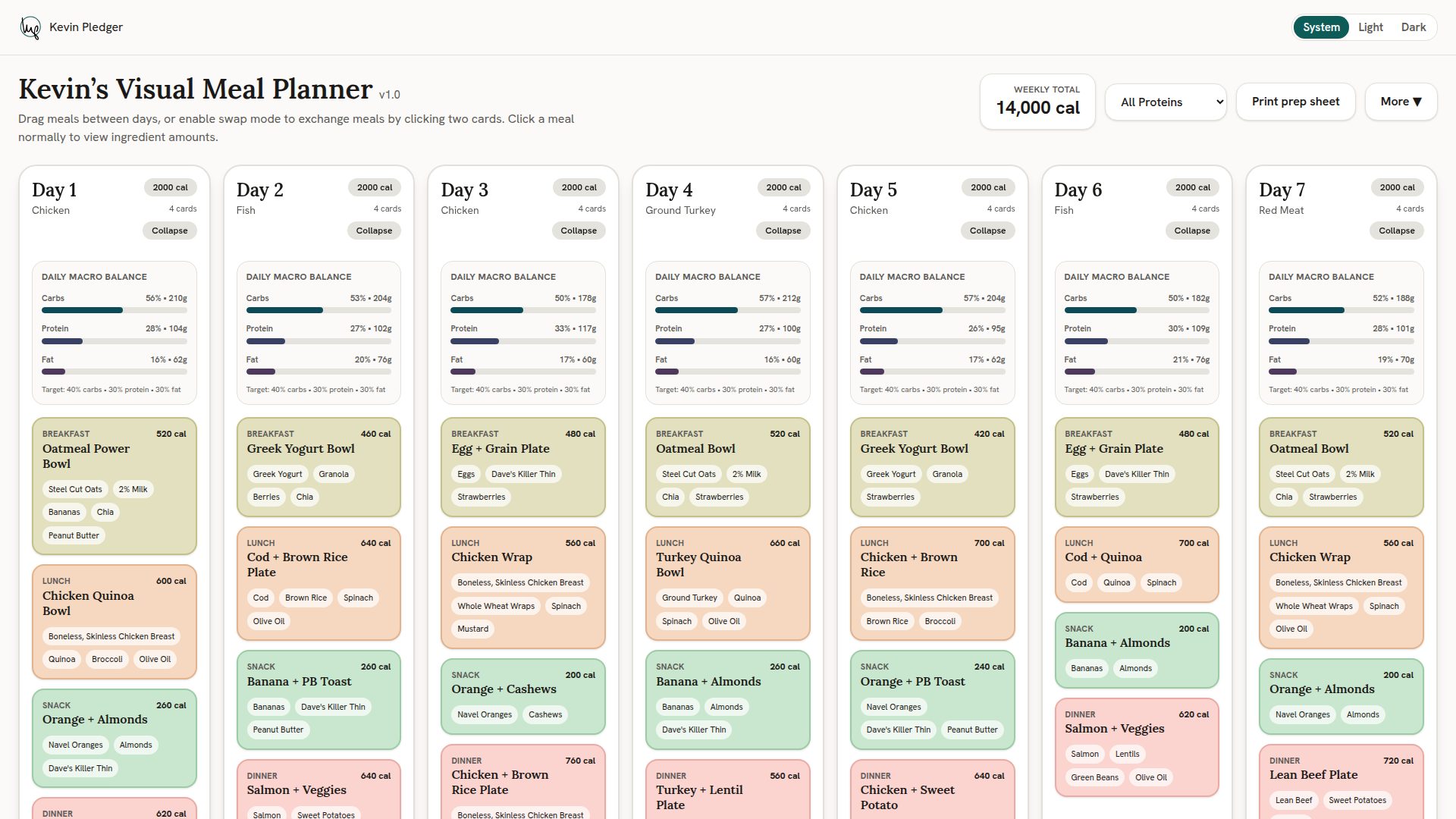
1. What a first visit shows: the plan as hard-coded, at 14,000 calories.
-
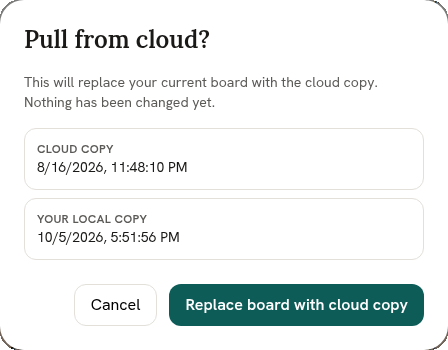
2. Pulling from the cloud asks first, and shows which copy is which.
-
3. After the pull: my board, at 13,187 calories.
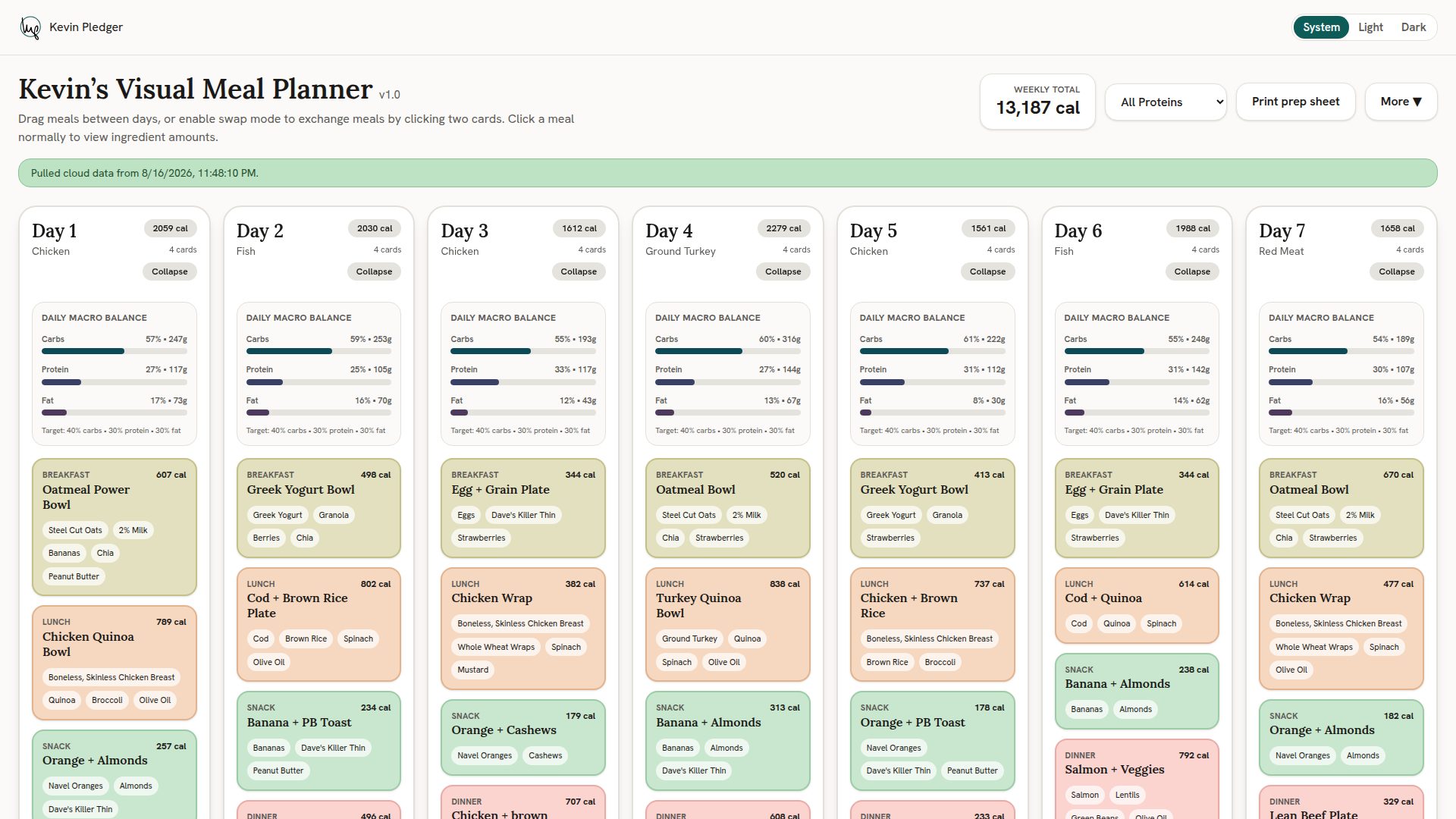
The last one is my board, not the one you’ll see. A version of the plan is hard-coded into the app, so a first visit shows her July revision, when she took me from 2,200 calories a day to 2,000. I changed the code for that one. Every tweak since lives in the cloud: when she revises the plan, I can edit the board in real time while we’re still on Zoom and push the changes to the cloud. The next time I open it on a different device, I pull them down and it’s up to date.
What I’d carry into the next build
Measure before you design. Every real fix in this project started from a number off the actual board, never from reasoning about the table in the abstract.
And check what a result means, not just that it arrived. A green run and a resolved match both looked like success here, and neither one was.